Showing posts with label Software. Show all posts

Tuesday, June 16, 2009

30th anniversary of the spreadsheet

My IT support person/husband has pointed out to me that it is the pearl anniversary of the spreadsheet. This IT PRO article reminds us of the history of this application.

The spreadsheet was the killer app of its day. With good reason, as far as I'm concerned!

As IT PRO puts it, the big deal about VisiCalc, co-created by Dan Bricklin and Bob Frankston in 1979, was that it

was the first useful programme for ‘grown-ups’. And absolutely crucially, it didn’t require the user to know anything about computers or programming. This was a very, very big deal at the time – as computers were largely the domain of essentially hardcore geeks who created their own programs and had in depth knowledge of computer languages enabling them to do that.
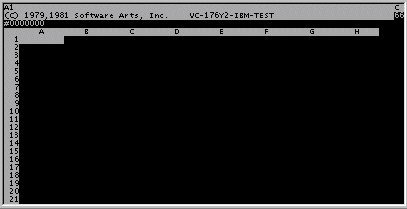
(Image is linked with one on Dan Bricklin's website)

It was this fact that kicked off the migration of the computer that I covered (if you can call it that) in this bit of silliness. Suddenly, the computer became a thing 'normal' people could use.

For 17 years, my job was largely that of a classroom-based IT trainer. VisiCalc was a little before my time, having been launched while I was still in high school, hell-bent on a life on the stage. But I was certainly around during the heyday of its major successor, Lotus 1-2-3, and I was on hand to watch that get deposed by Excel. Now Google docs offers a spreadsheet, too.

I have to say that, for anyone who wants to make serious use of a spreadsheet, my money is still on Excel. Google docs spreadsheets have limited functionality. On the other hand, Excel isn't great for collaboration, so it's a bit of a trade-off. For now. No doubt one or other side will close the gap. But even the latest version of Excel and Google docs are still recognisably based on the original VisiCalc idea.

If you'd like to have a look at VisiCalc for yourself, or (and I recommend this) if you're a teacher/parent who wants to show a bit of history to your kids, you can download it from Bricklin's website... as long as you have a PC which runs Windows or DOS. You can remind yourself of the commands by means of this (5 panel) reference card.

Have fun!

Friday, February 13, 2009

pic of the day - I'm a winner!

You could have knocked me over with a feather when a recent email arrived from TrainingZone magazine telling me I had won a prize at their stand during Learning Technologies 09. I hadn't even known I had been entered into a competition! For a moment, I even thought it might be a hoax.

But sure enough, my prize arrived today: a Kensington SlimBlade presenter media mouse and a copy of Tony Buzan's iMindMap software.

Cool!

Thursday, January 08, 2009

Articulate '09

If you're not familiar with Articulate, this post will mean little to you. If you haven't yet encountered it, Articulate is a suite of apps that can be used to transform a PowerPoint presentation into an elearning module, complete with interactions and quizzes. It allows non-techies to develop learning resources. It is a very useful tool, although (as I have said before) some organisations are wielding it like the all-purpose hammer that makes every identified learning need suddenly look remarkably like a nail!

One of the greatest frustrations for me when using Articulate in the past was that, unless you had access to the SDK (and the skills to use it!) your Engage interactions stood out like a sore thumb against your Presenter screens. This was because, while the user could format the PowerPoint slides as they wished, the interactions were autoformatted. There were three options:

  1. Create the entire module as a series of Engage screens, with no flat PowerPoint screens in between
  2. Try to fudge your PowerPoint slides to look roughly like the interactions (rather limiting and only partially successful)
  3. Shell out £1200 to a company with the SDK for a customised template
However, this issue has been rather well addressed in the '09 release, in which you now have far greater control over the look and feel of the interaction screens.

I am busy with my first project using '09 and am very pleased with the seamlessness of the transition from slide to interaction and back again.

A definite thumbs up on that point.

Saturday, February 02, 2008

I learned to draw a marble!

Today, my team attended an Articulate workshop, run by my colleague, Mark Berthelemy. I've done some work with Articulate before, so, while I picked up all sorts of little bits and pieces, I didn't learn anything earth shatteringly new in that respect.

Ironically, I pushed the boundaries on my knowledge of an app that I know extremely well. An app on which I ran training courses for so long during my years as an IT trainer, that I can't even remember when it started. A little thing called PowerPoint, with which I have a love/hate relationship. I love what I can achieve with PowerPoint. I hate being subjected to what some people are pleased to call PowerPoint presentations. And if I never see another bullet point again it will be too soon!

But I digress.

One thing I learned today, which was totally incidental to the issue at hand, was how to use the "drawing" feature in PowerPoint (or Word, or any of a myriad other apps for that matter) to draw a very realistic looking 3-D marble. The lesson was being used as an example of passive learning that is still engaging. It certainly proved to be so because, when Mark felt that he had made his point and wanted to continue with the Articulate workshop, I wouldn't let him! I had to see it through.

Then I came home and showed off my new skill to my husband and taught my sons how to draw marbles.

So I may well have lost my marbles, but it seems I can just draw myself a whole bag of new ones.

Okay, so I'm never going to conquer the world with this new found skill, and it isn't going to move my career forward any time soon, but I'm having fun... and tell me you're not secretly impressed by my marbles!