Showing posts with label Technology. Show all posts

Tuesday, June 17, 2014

FT Digital Learning Week: Women in digital leadership

As part of the Financial Times digital learning week, I attended an early session today on women in digital leadership. Chaired by Megan Murphy head of Fast FT, the panel consisted of Molly Flatt from 1000 Heads (among other things), Anne Marie Imafidon from Deutschebank and Stemettes, Claire Koryczan from Decoded and Karla Geci from Facebook.
Molly Flatt, Anne Marie Imafidon, Megan Murphy, Claire Koryczan, Karla Geci
For me, it is a frustration that we even still have to have sessions like this. When they are no longer needed, we will have arrived. Maybe.

What came out of today's session is that the number of women in tech has actually declined over the last 30 years - in the US, at any rate. This saddens me. You see, when I was in high school in South Africa (far more than 30 years ago!), local industries were so desperate for computing staff (the term 'IT' wasn't being used, yet) that they were recruiting straight out of schools off the back of an aptitude test offered to kids with maths skills. Starting salaries were really good, and there was the promise of being able to work towards a degree while working. Right in the thick of the patriarchal, apartheid era it was the first profession in which gender and race were shoved aside and demand became the sole driver. So the declining numbers being reported today are disappointing - all more so since the skills around the field of tech have become more blurred. It's not just a case of writing code any more - there is a need for community management skills, social engagement skills... all those 'soft' skills have found their way into tech. And those are areas which have traditionally attracted a large percentage of women.

The question was asked  whether women have a problem with tech or the tech industry has a problem with women, and the general consensus was that it must be the latter, because the former was simply not true, based on the experience and research of the panel members.

So having these women as role models for women starting out in tech is important. Having organisations like Stemettes giving girls confidence to operate in the science/tech space perhaps even more so, since this addresses the matter at grass roots level (because, let's be real - few kids will have heard of these women, yet - they don't really blip on the average young person's radar).

I'm not sure that I came away with a fistful of answers, but I would suggest that perseverance in raising awareness is at the very least a start.

However, I would be loathe to see women pressured to move into senior management roles or risk being seen to be letting the side down. Leadership is not the same thing as management or seniority (for example, I would contend that Malala Yousafzai's achievements make her a leader), and we need to take care not to conflate the two concepts. I would also like to see women in the role of specialist practitioner, becoming leaders in their field by dint of the sheer quality of their work and the level of expertise they gain, and being afforded the same level of respect, support and mentoring as captains of industry.

Thursday, May 22, 2014

'Over dependence' on technology

When the news is filled as it currently is with news of a data compromise at eBay, it is quite common to hear people say things like "this is what happens when we are over-dependent on technology."

They say the same things when the link to an online learning resource won't work, or people lose their connection to a webinar. Isn't it terrible? We're so dependent on technology, and everything grinds to a halt when it lets us down.

But let's just stop a moment before we all get hysterical about technology being to blame for all that goes wrong in the world. Our lives are filled with technology that we don't even refer to by that name any more. Your cooker is technology. Your pen is technology. Your car is technology. Your old manual typewriter (supposing you have one) is technology. They've just been around so long that you don't think of them as such any more.

When your cooker stops working, you don't curse your over-dependence on gas/electricity to provide food for your family. When your car breaks down, you don't make a blanket statement about how we should have stuck with horses.

Did you once use overhead projectors? Did the bulb sometimes go when you were right in the middle of a class/workshop/presentation? Should we have reverted back to the days before OHPs were invented? Nah, you just came up with an alternative and moved on. Because you're resourceful like that.

The thing that has happened at eBay is serious. It could be more serious than they're letting on. But the dust will probably settle and people will go back to business as usual.

Mistakes and challenges have always been a part of life and always will be. The technologies that we curse when things go wrong were developed in the first place to address some other problem. Before we had online learning, distance learning had to involve large quantities of printed materials being sent hither and yon, which was costly on so many levels. Before we had distance learning, people had to travel somewhere to participate in a learning event, which was ditto, and disruptive to boot.

So the next time you lose connection to your online learning event (which might happen to me within the next half an hour as I try to log in to a webinar with a splendiferous thunderstorm doing its thang overhead), take a breath and try again. The world hasn't come to an end, and it's probably no more of an inconvenience than when the assignment you submitted by mail didn't reach its destination by deadline date, or your car broke down on the way to a residential course.

And, just to keep your sense of humour intact, the next time the water is cut off to your home while they work on the pipes somewhere in your neighbourhood, say out loud to yourself, "This is what happens when we become too dependent on running water!" Because taps (faucets) are technology too.

Thursday, April 17, 2014

Can we stop with the age labels already?

At a recent meeting, one attendee made an observation about how, when it comes to learning solutions, young people are comfortable with the use of technology, while older people are not. I challenged this, pointing out that I (being north of my 50th birthday) fall into the 'older' category, and I am perfectly comfortable with digital solutions (just as well, since I design them!). The person responded with, "Yes, but you're the exception."

It wasn't an unfriendly exchange, that was simply her perception. One that I'm finding to be fairly widespread, and many late adopters are citing this as their reason for delaying the deployment of digital learning components in their learning solutions - they still have some older people on the staff.

But is time we put this perception to bed, now. For one thing, it's ageist.
Jane Hart and Harry get techie together
I think generational labels like digital immigrants/natives, millennials, GenY, etc are anything but helpful in this regard, because they carry with them implications which the reality simply doesn't bear out. In fact, many of the movers and shakers in this field are no longer in the first flush of youth by any stretch of the imagination.

Let's look at some case studies:
  • Today, I read a blog post by Tony Bates, announcing his retirement. Tony recently turned 75, and many commenters are skeptical that he will be able to stay retired, because he lives and breathes online learning.
  • Jay Cross is often credited with being the first person to use the term e-learning. Whether or not this is true isn't really the point. What is the point is that Jay is one of the movers and shakers in the field of digital learning, and - as far as I know - his 60th birthday is in the past. The link takes you to a website, but you'll find him on Twitter, Facebook, Google+, LinkedIn, Diigo, Pinterest... 
  • Jay is the CEO of the Internet Time Alliance, a collective which helps organisations become more networked, collaborative, distributed and agile. The other members of this group are Harold Jarche, Charles Jennings (think 70:20:10), Clark Quinn and Jane Hart (of the annual 100 top tools list - see photo). I'm on hugging terms with all these people, so I hope they won't mind me telling you that none of them will ever see 50 again. On his Facebook page, Charles recently shared a video of himself playing the banjo (the man is a skilled musician, as so many learning geeks appear to be) on the occasion of his 65th birthday. Jane Hart's Facebook page is full of photos of her adored grandchildren.
  • Stephen Downes is a highly regarded "commentator in the fields of online learning and new media" (as his wikipedia page asserts). His OLDaily blog posts are varied and interesting - required reading for anyone who wants to keep up to date with developments in the field. He celebrated his 55th birthday earlier this month.
  • Together with Stephen Downes, George Siemens developed the Theory of Connectivism as a way of describing learning in the digital era. In his early 40s, George is probably going to be the baby of this group that I'm throwing together here today.  I just hope he doesn't mind being lumped together with all these oldies ;)
There are many other examples of luminaries in the field, and I could sit here all day, listing people - purely from memory - who are leading lights in the field and north of 50. But let's come down a notch to more everyday people:
  • My Facebook friends list includes at least two people in their 80s.
  • I keep in touch with my 74 year old Mom by means of WhatsApp and Skype. When a WhatsApp message arrives from her, my screen announces her as 'Barbara the Legend'. And that's what she is.
  • My doctors' surgery has an interactive screen by which patients of all ages make their arrival known. I've seen them do it.
  • Buying groceries online and having them delivered is a boon for elderly and/or infirm customers. I have no concrete examples, but I'm confident they exist, and that more people would use the facility if they just got a little help with the initial learning curve.
  • Autobanks are used by people of all ages. Next time you use one, take a look at the demographic of the other users.
  • eReaders are a great tool for bookworms with arthritis and/or grandchildren. Imagine being a grandparent with an entire library of books in your handbag/pocket! I'm not a granny yet, but I know all about how the pain of arthritis! There are some fabulous interactive ebooks to explore with grandchildren.
  • I've read Amazon book and product reviews by people of all ages.
  • And on and on and on
We have got to stop thinking of digital spaces as being the comfort zone of the 'young'. Jane Bozarth often refers to herself as 'the oldest millennial'. I think there are several others who might give her a run for her money (caveat: I have no idea how old Jane is).
Give your older staff members some credit. I'm pretty sure they'll surprise you.
Before I go, let me share this BBC article (with video) about 'cybergrannies'.

Friday, April 11, 2014

Running an Articulate Storyline module on a non-iOS mobile device

A lot of blood, sweat and swearing has gone into the back story behind today's post.
 
I am preparing to run a short internal workshop about the use of technology in learning. As part of that, I thought I might start with a brief, fun quiz, designed to demonstrate to my largely tech-shy colleagues that they are not as digitally illiterate as they think. Of course, it makes sense to deliver that quiz using technology in an intuitive enough form that it supports my message, right?
 
Devising the quiz
So I opted to use Articulate Storyline. I am fairly adept with Articulate Studio, having used it to build solutions for several of my clients when I had my own business, but I have only recently been coming to grips with Storyline. It's very handy for this sort of thing. So here we had learning experience 1. I made a few mistakes, and oversights, which revealed themselves in the test stages, but I managed to sort them out (I think).
 
The challenges
Creating the quiz proved to be the easy bit. The difficult bit comes when we start looking at the tech for the workshop. Here are the challenges I faced:
  • There isn't enough cabling in any of our meeting rooms for everyone to bring along their laptops and access the quiz on our shared drive.
  • There is only one, rather feeble, wifi network in our offices, which doesn't reach the meeting rooms.
  • We have no supported tablets in our offices. We do, however, have some unsupported ones. These are generic non-iOS devices.
  • The unsupported devices don't have access to our network drives.
  • I don't have a space suitable for hosting the quiz module in a workable format.
  • Normally speaking, in order to run an Articulate module on a tablet, you have to publish an html5 version and download the Articulate Mobile Player app from iTunes. That means it's only available to iOS devices.
With the help of my remarkably supportive husband for some bits, this is what I will be doing:

Creating a wifi hotspot
I will create a wifi hotspot in the meeting room by bridging the networks on my laptop as follows (I hope - this bit has yet to be tested!):

Hosting space
The tablets can then use that wifi to access the quiz. However, as I mentioned, there isn't a suitable space for me to host the quiz. So I'm hoping that I will be able to impose on the good graces of the people at Articulate to host the quiz on their tempshare space for the occasion. It is a little frustrating that I need to do this at all, but let's not go there for now.

Accessing the quiz
Of course, the resultant link from the tempshare space will be a long-ass string of letters and numbers and I don't have a way of storing that link on the tablets, so I will use Bitly to shorten it and then, rather clunkily, ask my attendees to enter it manually into the address bar of the browser.

Browser
This brings me to the matter of the browser. As I mentioned, these are non-iOS devices. In order to run an Articulate module on a mobile device, said device needs to have the appropriate app. This app is only available from iTunes, so applies only to iOS mobile devices. However, thanks to this post by Robert George on the Articulate forum, I discovered that the way forward on my cheap and cheerful tablets was a browser called Dolphin.

Having done that, I no longer needed the mobile player app. The tablet could run the quiz without it.

So, at about midnight last night, my husband and I high fived each other and dragged our exhausted butts to bed.

Now to see if I can replicate this in the office! It all hangs on that wifi connection!

Wish me luck.

Thursday, February 10, 2011

Social tools in the workplace... when they fail and why

Jane Hart has written an excellent article about the top-down implementation of social tools for workplace learning and why that approach is doomed to failure. As she points out, top-down is the traditional approach for implementing a new initiative, but in respect of social media for learning:

  1. Those that are already collaborating, sharing and learning with one another, will resist attempts to force them to use other social tools or platforms in order to track and control what they are already doing. This may well push their activities even further underground.
  2. Those that have yet to experience, understand and feel comfortable with social media will not want to be forced into sharing and collaborating when they are not ready for it, and are likely to resist attempts to make them do so.
Hart suggests a more bottom-up approach. Providing support to those who already are sharing and collaborating with one another. I would also recommend a performance management attitude that gives kudos to those who are seen to be supportive of their colleagues. In this post in December, I talked about the value of the enabler within your team. Give these people kudos and the space to 'do their thing' and you stand to gain a great deal. As Hart's article says, "autonomy is a powerful motivator" and "better results come from getting out of the way".

I wonder how many managers have considered that the biggest barrier to excellence in their team's performance might be their own attitude to people management (and people, come to that).

It's funny how these things go in waves, because yesterday, Aliza Sherman published an article called 5 Reasons why Corporate Social Tools Fail. Top of the list for her is the lack of a social culture. As she says, mandating the use of x and y tools isn't going to change anything if you don't already have a culture of mutual support and collaboration within the organisation. Too many organisations make this very mistake. It's not about the technology. The technology is a just a conduit, a tool. You can give your 17 year old a car - that won't make him a competent driver! But, if he is already a driver, having his own car will enable him to do so very much more.

It has to start with culture. So we find ourselves back at Hart's article which identifies the need for more autonomy and more getting out of the way. Less micromanagement and more belief in your people.

Thursday, December 02, 2010

Crossing the language divide using online tools

I'd like to tell you a true story about something that happened to me quite recently.

We keep getting mail for the previous owners of our house. We have lived in this house for more than two and a half years, so mostly, it's just junk mail. But there's one rather serious-looking envelope that keeps arriving from Paris. It's addressed in French and indicates it contains official documents which require a signature. I think it has something to do with tax, but I'm not quite sure what gave me that impression.

I have repeatedly done a return to sender, but the documents keeps returning, each time with a more urgent looking message on the envelope. Last time, I wrote on the envelope in large letters: Mr Bloggs has not lived at this address for well over two years, please update your records.

The documents came back last week.

I was tempted to open them to find some contact details, when I noticed what appeared to be a phone number on the front of the envelope. Nothing ventured...

I used Google translate to find out how to say, "Is there anyone there who can speak English, please?" and practised it a few times.

When the phone was answered, I stumbled through "Est-ce qu'il ya quelqu'un qui parle anglais, s'il vous plaƮt?"

The lady told me that there was not.

Hmm. How was I going to explain my situation to her? I know enough French to say "Je ne parle pas francais, mais une moment, s'il vous plait..."

I typed into the translate box, "You keep sending me letters for Mr Bloggs." followed by "But he hasn't lived in this house for more than two years." I then used the 'listen' button to play this to her through my phone.


She figured out (more or less) what I was doing and spoke very slowly back to me in a combination of French and English. Eventually, we managed to establish that I no longer wanted Mr Bloggs's tax demands (or whatever they were), that I didn't have a forwarding address for him, and that she should stop sending his mail here.

It was clunky, but you know what? It worked. Now where's my flipping babelfish?

Friday, October 15, 2010

More about QR codes

Thanks again to Paul Simbeck-Hampson for the link to this video about a creative use of QR codes.

Forget about the content of the book in the example. Think laterally. Consider the possibilities! Here we have the potential for a book that self-updates. Just as you do with web pages, when something changes, you update the source material, and the user accesses the most up to date information.

Just in time information.

As a teaching and learning resource, this is dynamite!!!!


Later edit: At Paul's suggestion (see comments below), I am including this video which shows some of the potential usage of the technology:

Thursday, October 14, 2010

Playing with QR codes

I have just been speaking to Paul Simbeck-Hampson (he gets around, doesn't he?) about QR codes and both of us have been waxing enthusiastic. In fact, I wouldn't be surprised if he posts about them too!

In case you're not familiar with them, a QR code is a kind of variation on a bar code, only instead of bars, it has tiny squares of black and white, in which information can be embedded. The information can be text, or a URL, or even audio.

With the means to scan these codes, all manner information can be shared. Paul and I have both loaded an app onto our smartphones that reads and generates these codes. He has an Android, while I have an iPhone. If our conversation is anything to go by, the Android version seems to be better.

Also, Google translate has a QR feature (and an app for Androids). Using the smartphone, you can scan and decode the code for the word you have looked up.

We were discussing possible learning applications for these codes and I shared about a speaker at the eLearning Africa conference in May (it pains me that I can't remember his name, even though he and I spoke at the same session), in whose organisation QR codes are being used to overcome language barriers. The code may be placed upon an item of furniture, for example. When scanned, this reveals the name of the item of furniture in the desired language, together with an audio of the correct pronunciation. I guess you could link to a list of the words for that item in any number of languages.

Similarly, the codes are being attached to informational posters in the office, containing a translation of the content in the user's language.

Just think about the potential applications:

  • shipping consignments
  • museum exhibits
  • tourist attractions
  • bird identification rings
  • ...
I reckon the list is only restricted by the imagination! Talk about ubiquitous learning!

Thursday, May 06, 2010

Send us your sample

This strikes me as being a really fun option for teachers of the sciences (among other things).

A company called ASPEX, which produces scanning electron microscopes (SEMs) and microanalysis software has kicked off a campaign called Send us your Sample, which invites anyone to send in an object of their choosing and have it scanned free of charge under one of their SEMs.

You can send in anything you like - a toy bunny, a dead bug or an old toothbrush. It's pretty cool. See their image gallery here.

They also have a rather fun thing called 'name that sample' where you have to guess from the 'after' picture what the object is. Could you have guessed that this was an image of Hall's cough drops? If so, you might have won yourself an Apple iPod Touch.

Monday, April 26, 2010

Most influential women in tech?

The Fast Company has posted their 2010 list of the most influential women in technology. Of course, there will be those who are surprised to have been included, and those who are furious not to have been listed. But the list makes for interesting reading.

Wednesday, March 24, 2010

Ada Lovelace day

Today is Ada Lovelace day when we celebrate women in technology. I'm not usually much of a one for girls-only recognition, but perhaps we are still a long way from the point where technological jobs are seen as being as open to women as they are to men.

I have to say that I think the exception is the field of ICT and related matters. Because of the relative newness of the field and the speed at which it has developed, there was no time for sexism. So, instead of writing about a particular woman in information/comms technology, and instead of extolling the many virtues of the women in my network, I am going to take a slightly different approach.

I would like to give a shout out to all the anonymous female motor mechanics, electricians, engineers of all kinds, fighter pilots, microsurgeons and so on. All the girls who hold their own in fields still largely seen as the male province.

When I was coming to the end of high school, I really wanted to be a mechanical engineer. I wanted to design machines. I like the way machines work and they make sense to me. Since we had no money to speak of, I was going to need a bank loan, so we set about applying for one. Every bank manager we saw told me the same story: they were not going to lend money to a girl who wanted to study mechanical engineering, because the attrition rate was too high, the risks too great and the return on the investment doubtful. I was encouraged to consider chemical or light current electrical engineering instead. Since I was hopeless with both those areas of the science curriculum at school, I had no interest in going that route.

I admire those women who haven't taken no for an answer. Who have activated their 'I'll show you' button and who earn their keep doing jobs that their grandmothers never heard of and that their mothers thought only suitable for boys.

One such anonymous woman was my husband's late aunt Gunnel Bjureblad, who was an engineer. She died four years back, aged 70-something, and I imagine the opposition she faced in her day was even tougher than my own, especially since her Dad thought that education beyond the age of 14 was wasted on a girl.

Call it a cop out if you like, but I salute the Gunnel Bjureblads of the world today. All of them.

Friday, January 29, 2010

A body of evidence

So I've been on a diet for a few months now, having returned to the sort of exercise regime I prefer once my major project had been submitted. I've been very good about not leaping onto the scales every day, but I have had a little weekly weigh-in and measure up to keep track of my progress (7.6kgs or 16.7lbs to date). A little performance review, if you like.

Today, I poked my scale with my toe to activate it.
Nothing.
I changed the battery.
Nothing.
I gave it a little shake.
Nothing.
I swore at it.
Nothing.
I engaged in a little percussive maintenance (i.e. I smacked it a few times).
Nothing.

I went out and bought a new one.

Now I just knew this would happen: the new one tells me I weigh .8kg more than I did last Friday. I know that I don't, because I lost another 4cm around my waist in the last fortnight, and I've outshrunk (well, what's the opposite of outgrown, then?) trousers I bought in December. It's an anomaly of the way scales work - no two ever seem to tell the same story, so you just pick one and stick with it, making sure the trend is in the right direction. When you have to change horses in the middle of the race, there's bound to be a bit of teething trouble.

Ah, but you see, from now on, my scale will not just weigh me, it will keep track of my weight. It will also keep track of my husband's, our sons' (should they care) and up to 6 other people.

Not only this: the scale blithely told me this morning what my body fat percentage is (in the healthy range), what my total body water percentage is (healthy), what my muscle mass is (no guidance given) and what my BMI is (still in the overweight range - go figure).

So, I have a ton of metrics to work with.

All this makes me think of workplace learning and development (plus ca change!). Here we have this learning department getting on with doing the job. Then we decide to introduce new technology (while, in the case of my scale it was because the old technology was broken, this is not always the case in the world of L&D). While we get used to the new technology, there will be glitches and setbacks. But of course, the powers that be will be won over by the promise of metrics. You will be able to see exactly who's done what, when and how well. Each user's every move will be recorded and reported on.

Ugh.

Now I'm not saying we should go back to a bygone era. I'd be among the last to suggest that. What I am saying is that we get a little happy with our tracking and our metrics. Sometimes we forget that to deliver the goodies on these, some poor blighter is going to have to generate a report, create a few charts.... and the explain what the significance of it all is.

In my case, things are working as they should when I get back into my Levi's.

In the case of a business, things are working as they should, when the business is performing as it should.

No?

Another one for the history teachers and history geeks

The British Library has produced another interesting resource. This time it's an interactive timeline. It starts with the signing of the Magna Carta in the 1210s. I'm not sure why they haven't gone further back than that.

You have the option to select what sort of events you're interested in learning about. So, for example, you can look at the core, or central timeline. Or you can explore politics, power and rebellion; art and literature; sacred texts; everyday life or medicine, science and technology. The container for the timeline options is not full, so one assumes they plan to add more at some point.

Once you have selected your timeline, you can scroll left and right through the events listed, and select one of your choosing. In the medicine, science and technology timeline, for example, I chose an event dated c. 1300 called 'examining urine'. There is a brief blurb and an image. The blurb ends with the library's shelfmark, while the there is an option on the image to zoom in. There is also a link to a page about medieval times on the library's website.

One option I found very interesting was being able to draw comparisons between key events in two of the timelines. For example, I chose literature, art and entertainment, and compared it with medicine, science and technology. This is a great way to see how developments in one field influenced another. At the moment, I am playing with medicine, science and technology vs everyday life. Very interesting.

Best of all, you can create your own timeline. Unlike the historical objects database I posted about a few days ago, you can't add your own items to the list. But you can 'favourite' objects from any of the timelines to create a customised one of your own.

One small point worth mentioning, there are a few options to manage the display - 2D and 3D, a choice of four backgrounds, and the option to view full screen.

There is such a wealth of exciting material out there at the moment, that I can't decide whether it would make being a teacher more interesting or more frustrating. More interesting because it provides a wealth of support materials to bring into the classroom, or more frustrating because the national curriculum restricts the extent to which one can explore such resources with students.

I certainly intend to introduce my sons to the timeline, particularly the younger one who, as I have mentioned before, is about to start studying history with the disadvantage of no prior exposure to the subject (other than endless museum trips with his geeky parents, that is!).

Thursday, January 14, 2010

Charging the iPhone

So there I was, on the train to London, when my iPhone died on me. Not in any permanent sense, you understand. Just in that all too frequent battery-needs-charging kind of way. The evening before, there had seemed to be a fair amount of charge left in the battery so I had made the mistake of not plugging it in. I had made the even worse mistake of leaving the house without my charger. All iPhone users know that you simply don't do this. iPhones chomp through their battery life at a notorious rate!

As it turned out, it would have been preferable if my phone had not chosen that moment to die on me because, shortly after the trained pulled out of the station, the convenor of the meeting to which I was headed tried to phone me to tell me it had been cancelled due to the weather. While it was too late to save myself the cost of the ticket, I could have got off at the next station and come back home, saving myself a lot of bother. London is a place I only visit out of necessity - when that necessity is removed, so is all desire to head towards the Big Smoke. As it was, I only learned of the cancellation when I arrived at the venue covered in a light dusting of snow with ice blocks for feet.

In the absence of my charger cable, I had popped into a few places on St Pancras station, looking for one of those one-off battery doodads that you plug into your phone to give you a DC power supply. No-one had them. Sod's law. At one stage they were everywhere.

I did find one option at Vodafone. They have a tower of coin operated charging bays in little lockers. They work pretty much like a parking meter. You plug in your phone, pay your money, lock the box and go and amuse yourself for half an hour (or whatever). Sadly, my phone wasn't having any of that, and the battery was as flat when I returned as it had been when I left. They refunded me my £1 (which was the cost of a half hour's charge time) without even being asked.

But perhaps it would have been better if I had had one of these two things for charging up the iPhone, as reviewed in PC magazine (and drawn to my attention by my sleep-in technical support man). I love the description of the solar charger as being "as much use a cat flap on a submarine in Britain’s current climate". Perhaps I won't dash out and buy one of those, then! Especially at that price tag. The Dexim P-Flip, on the other hand, has promise. I might have to explore that.

Monday, November 23, 2009

Wouldn't it be cool?

I went to the gym today. Okay, there's nothing interesting about that.

I was wearing my heart rate monitor. Nothing particularly interesting about that, either.

But, as I was working up a very unladylike sweat, I was keeping half an eye on my heart rate and it occurred to me...

The heart rate monitor was bought online at a random purveyor of such goods. It is not the first one I've owned, and it is a completely different make from the one I had before. But the moment I step onto any of the machines in the gym, it communicates with that machine. Just as its predecessor did before it disappeared into what I assume must be the same black hole as a host of odd socks from the Romeis household.

All around me there might be people working out on the machines, each of them wearing their own HRM, with a variety of different types represented. And in each case, the machine is faithfully relaying the information it gets from the HRM of the individual concerned.

C'mon! How cool is that?

No one has to jump through any hoops to get their HRM to talk to the machines. It just happens.

A little bit different from when I go to stay in a hotel, and have to go through a whole series of steps before my computer can talk to the Internet. And when I go to visit a colleague or a client, if it is even possible to connect to the Internet from the site at all (which is rare), I have another series of back flips to do. Otherwise I have to use a dongle.

I know. I know. Security and all that stuff.

But wouldn't it be cool?

Wouldn't it be cool if my computer and the Internet service in every locale just greeted each other like old friends who pick up where they left off? If there wasn't even a pause as I left one building and entered another?

Just daydreaming...

Thursday, October 29, 2009

Xtranormal - what fun!

Here's a free tool you can use to put together some quick animated movies. It looks pretty straightforward and rather fun. I can think of umpteen uses for it, both in schools and in business.

Thursday, October 01, 2009

Adrienne Carlson: iPhone apps for academic types

I am not an 'academic type' I realise this afresh every time I take on the challenge of writing an academic paper. However, I have synergy with a great many of the things that drive people who *are* academic types... and if any of those drivers can be addressed by an iPhone app, so much the better.

Adrienne Carlson is a relatively new contact of mine, and she has listed 100 iPhone apps for academics. Some of them I already use, while others are totally new to me. Many of these I suspect would be of equal interest to people outside of academia, too. What she hasn't done (unfortunately) is indicate which of them are free, but I guess a quick visit to the app store should determine that.

Wednesday, June 17, 2009

Elearning in Africa

"If you look at the one laptop per child programme, if I remember correctly, the Nigerian government cancelled their order because they couldn’t afford desks to put them on.”

John Traxler, LearningLab director at the University of Wolverhampton

This article in TrainingZone magazine (you will need to register to read it, but it is free) highlights some of the challenges facing those who look to deploy technology-supported or technology-based learning solutions in Africa. Presumably many of the challenges mirror those faced in other parts of the developing world.

Among these are
  • lack of hardware - many students do not have a computer at home and have to attend a teaching institution
  • lack of infrastructure - while there may (or may not) be computers at the aforementioned teaching institution, there is not always a teacher
  • poor internet speed - Africa has the lowest average internet connection speeds in the world at an average of 1.1Mbps as compared with over 6Mbps in Europe
  • and even lack of access to mains electricity (the UN’s Economic Commission for Africa estimates that only 20% of the total African population have access to electricity)
  • poisonous drinking water
  • high infant mortality rate
  • HIV/AIDS which is killing people off faster than they can be trained
So, to use a South Africanism, you can throw them dead with elearning, but until some of these basic problems are resolved, it isn't going to make a heck of a lot of difference. There are some far more fundamental issues that need to be addressed.

However, on the plus side, according to John Gordon AIS President,
[In Europe] mobile learning is either an extension of elearning or a reaction to it. It’s seen as tethered or limited, indoor. So mobile learning to a large extent here in Europe is a reaction to that; we’d like to take learning al fresco, into real life.

In southern Africa, there isn’t that history – they don’t have any elearning to react against – so if anything, mobile learning grows out of the distance learning model, often as a response to infrastructure issues.

Tuesday, June 16, 2009

30th anniversary of the spreadsheet

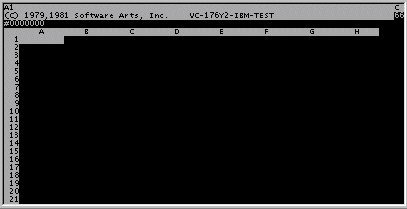
My IT support person/husband has pointed out to me that it is the pearl anniversary of the spreadsheet. This IT PRO article reminds us of the history of this application.

The spreadsheet was the killer app of its day. With good reason, as far as I'm concerned!

As IT PRO puts it, the big deal about VisiCalc, co-created by Dan Bricklin and Bob Frankston in 1979, was that it

was the first useful programme for ‘grown-ups’. And absolutely crucially, it didn’t require the user to know anything about computers or programming. This was a very, very big deal at the time – as computers were largely the domain of essentially hardcore geeks who created their own programs and had in depth knowledge of computer languages enabling them to do that.
(Image is linked with one on Dan Bricklin's website)

It was this fact that kicked off the migration of the computer that I covered (if you can call it that) in this bit of silliness. Suddenly, the computer became a thing 'normal' people could use.

For 17 years, my job was largely that of a classroom-based IT trainer. VisiCalc was a little before my time, having been launched while I was still in high school, hell-bent on a life on the stage. But I was certainly around during the heyday of its major successor, Lotus 1-2-3, and I was on hand to watch that get deposed by Excel. Now Google docs offers a spreadsheet, too.

I have to say that, for anyone who wants to make serious use of a spreadsheet, my money is still on Excel. Google docs spreadsheets have limited functionality. On the other hand, Excel isn't great for collaboration, so it's a bit of a trade-off. For now. No doubt one or other side will close the gap. But even the latest version of Excel and Google docs are still recognisably based on the original VisiCalc idea.

If you'd like to have a look at VisiCalc for yourself, or (and I recommend this) if you're a teacher/parent who wants to show a bit of history to your kids, you can download it from Bricklin's website... as long as you have a PC which runs Windows or DOS. You can remind yourself of the commands by means of this (5 panel) reference card.

Have fun!

Wednesday, May 13, 2009

What do we want to do?

This video (link via Judy O'Connell on Facebook) says much that is very telling. But for me, the key quote comes from Prof Stephen Heppell "Now [technology] can do anything we want. And the real question is: what do we want to do?" Until we have that question answered, I suspect we will continue to blunder around in the dark, fumbling and stumbling, unable to figure out why our occasional successes are successful.